
January 2026: GPS tracking, Job site import wizard, and more
The upcoming release introduces enhanced workforce monitoring and communication capabilities that improve operational visibility and field coordination. GPS tracking has been upgraded with configurable geofence and signal monitoring alerts, enabling proactive response to location-based events. Job site import and update is now done through an advanced wizard with better control over data validation, preview capabilities, and updates. Punch forms now support signature capture, allowing you to collect employee acknowledgments digitally during time tracking workflows. These updates strengthen your ability to monitor workforce activities, maintain consistent communication, and document compliance requirements across job sites.
GPS tracking and alerts
GPS tracking now provides enhanced location monitoring capabilities with configurable alerts. This update introduces system-wide tracking controls, geofence monitoring, and notification settings that help you maintain visibility of employee locations during work hours.
What's new
GPS tracking operates as a separate system within MobiClocks, providing battery-efficient location tracking that respects employee work status. Location data is collected and monitored only when employees are punched in and actively working.
Administration settings
GPS tracking is now configured through dedicated administration settings that provide system-level controls. Enable or disable GPS tracking across your entire organization from a single location. When enabled, the module begins monitoring employee locations according to configured settings.
Job site settings
When GPS tracking is enabled at the job site level, it takes priority over employee-level settings, ensuring consistent tracking policies across all workers at that location.
Geofence and signal monitoring
The GPS tracking module includes two types of alerts about tracking condition changes:
-
Out-of-geofence alarms. The alert is generated when employees leave designated job site geofence zones while punched in. Configure alert timing with options for 5 minutes, 15 minutes (default), 30 minutes, 1 hour, or never. Job sites can override the default timing to match specific operational requirements.
-
Signal lost alarms. The alert is generated when Personal App loses GPS signal while employees are punched in. Configure alert timing with the same interval options as out-of-geofence alarms: 5 minutes, 15 minutes (default), 30 minutes, 1 hour, or never. These alerts help identify potential tracking issues that may require attention.
Notification delivery
For the signal lost alarm, you can configure how notifications are delivered:
-
Push notifications: Send alerts directly to Personal App for immediate visibility.
-
SMS messages: Deliver notifications via text message to ensure critical alerts reach you regardless of app access.
How it works
The GPS tracking system manages the complete lifecycle of location monitoring based on employee punch status and server configuration. Personal App actively monitors location data only when employees are in a trackable state.
If an employee moves outside the job site's geofence zone or if GPS signal is lost, the system starts monitoring for the configured alarm threshold. When the threshold is reached, notifications are sent through the configured delivery methods. The app continues attempting to track location even during network interruptions, synchronizing stored data once connectivity is restored.
The tracking service stops automatically when employees punch out or begin a meal break, ensuring location data is collected only during active work periods.
Benefits
Improved workforce visibility: Monitor employee locations across job sites in real time, making it easier to coordinate field operations and respond to changing project requirements.
Proactive issue detection: Receive alerts when employees leave geofence zones or when tracking signal is lost, allowing you to address potential problems before they impact operations.
Flexible configuration: Customize tracking intervals and alarm settings at the organizational, job site, and employee levels to match your specific operational needs and privacy requirements.
Reliable data synchronization: Ensure location data reaches the server even after temporary network outages, providing complete tracking records for payroll and compliance purposes.
Job site import/update wizard
You can now import and update job sites using an enhanced wizard that provides better control over data validation, preview capabilities, and how the changes are applied.
Import wizard flow
The import wizard guides you through uploading a template file, reviewing changes in a structured preview table, and selectively applying imports or updates.
Template file format:
- Supports dynamic columns, including all user-defined fields and organizational unit assignments
- Requires exact column name matches (case-sensitive) for custom templates
- Example files exclude sample values for user-defined fields to prevent accidental data entry
Data preview and validation
After uploading your import file, review all changes in a three-section table structure:
Entries with errors: Job sites that cannot be imported or updated appear with detailed error messages highlighted in red. You can remove individual entries from this section before proceeding.
Updated entries: Existing job sites with changes appear highlighted in blue. Hover over any row to see previous versus current values for each field. The Updates column shows which fields are eligible for update with blue indicator icons. Select specific rows to update or use Update All to apply all changes at once.
Entries ready for import: New job sites that meet all validation requirements and contain mandatory fields (Job Site Name, Job Site Number, Job Site Address, Org Unit) appear ready for import. Select specific entries or import all new job sites with a single action.
Column filtering and management
Use the column selection control to enable or disable specific columns during import. Mandatory columns (Job Site Name, Job Site Number) remain enabled at all times. When columns are disabled, the system re-evaluates entries and may move them between sections based on updated validation results.
Important: Column selection is locked when any rows are selected for import or update.
Export functionality
Export your job site data by selecting columns and choosing your preferred format (Excel or CSV). Job Site Number and Job Site Name are always included in exports.
Permissions
The system enforces permission-based access control during import and update operations. If you attempt to import or update a job site that you don't have access to due to insufficient permissions, organizational unit restrictions, or job site assignment limitations, the entry appears in the Errors section with the message "You don't have permission to view this job site." For restricted job sites, only the Job Site Number and Job Site Name are visible during the process.
The new Import/Update Job sites permission controls access to the import and update functionality, while existing permissions like Create job site and Edit general settings determine whether you can import new job sites or update existing ones.
Benefits
- Efficient bulk operations: Import multiple job sites or update existing ones efficiently using standardized templates that align with existing report formats
- Error prevention: Review and resolve errors before importing data with clear validation messages and inline error indicators
- Selective updates: Choose which job sites to import or update through an intuitive preview interface with visual indicators for changes
- Flexible column management: Enable or disable specific columns during import to focus on relevant data fields
- Enhanced permission control: New granular permissions ensure secure import and update operations across your organization
Punch forms signature
Punch forms now support signature capture, allowing employees to provide digital signatures during punch-in and punch-out processes. The signature field enables touch or mouse-based signature input directly within the form, making it ideal for shift acknowledgments, safety confirmations, or compliance documentation that requires employee authorization. Signatures are captured as images and stored with the punch record for audit and verification purposes.
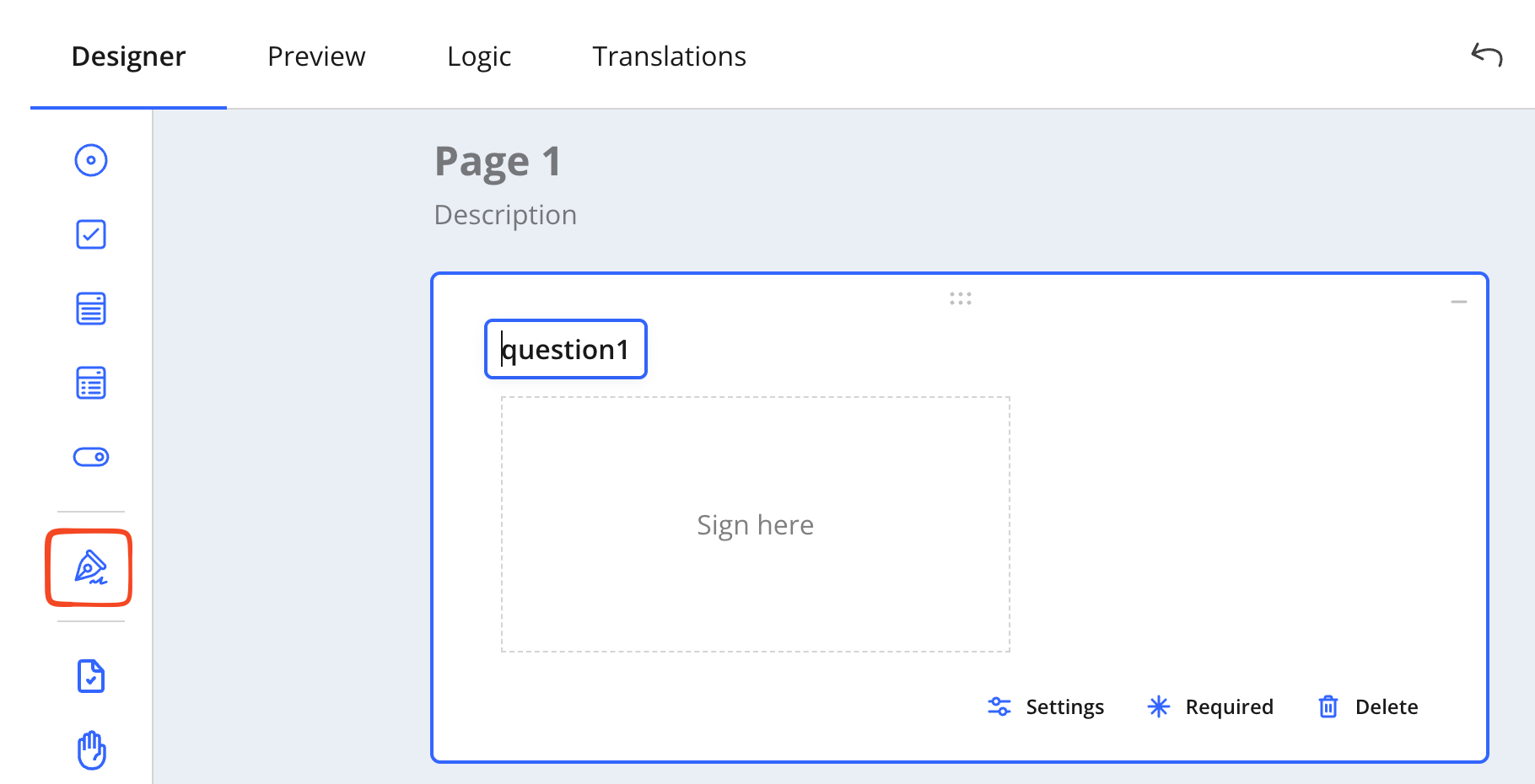
Adding a signature block in punch forms